Exhibitions and trade shows

Live interpretation and captions for exhibitions and trade shows

On an exhibition floor, visitors drift in and out of stage sessions and stand demos, and nobody is going to queue for a receiver. SIM.AI puts a QR code on the stage or the stand: visitors scan it, choose their language, and listen or read captions on their own phone. Captions matter most here, because exhibition halls are loud.

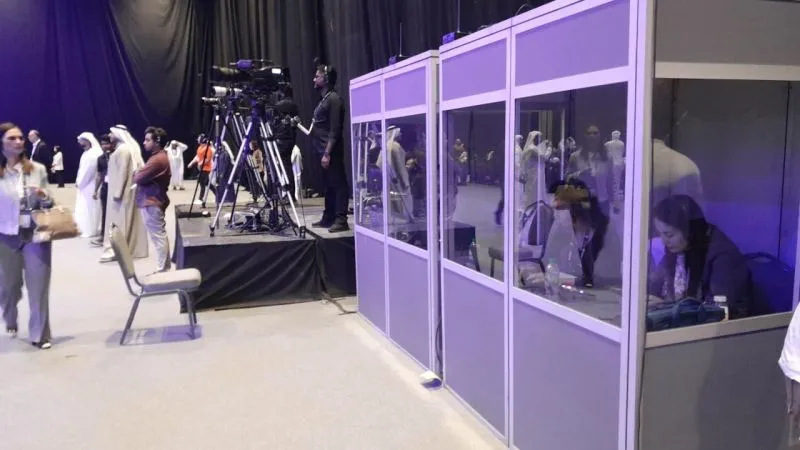
A row of illuminated interpretation booths beside a busy event floor with delegates and camera crews.
Interpretation booths beside the main floor at an international gathering in Abu Dhabi.

What matters most

Noisy halls, passing visitors, many stages

Exhibition halls are some of the hardest places to listen. Neighbouring stands play video, theatres sit side by side, and visitors stay for ten minutes rather than an hour. What matters is a join that takes seconds, captions that work where earbuds struggle, and audio taken straight from each stage's mixer rather than from the air of the hall.

Typical sessions

Where we work in this sector.

  • Content theatres and stages

    Open-sided theatres on the show floor with back-to-back talks. Each stage with its own mixer runs its own session and QR.

  • Stand presentations and demos

    A product specialist presenting on a stand with a headset microphone, to visitors from across the region and beyond.

  • Conference tracks alongside the show

    Paid conference programmes in halls next to the exhibition floor, with a quieter room and a full audio set-up.

  • Country pavilions and delegations

    Trade delegations touring the floor or hosting briefings at a national pavilion, often needing Mandarin, Russian or French.

  • Awards and opening ceremonies

    The show's opening or awards evening, where speeches are short and the audience is the widest of the week.

How we run it

From the first call to the last file.

  1. Map stages and feeds

    We go through the floor plan with the organiser and AV supplier, agree which stages and stands get sessions, and confirm a line feed from each stage mixer.

  2. QR where visitors look

    The session QR goes on the stage backdrop, the screen loop between talks, seat backs in the theatre, stand graphics and the show app's session page.

  3. Captions by default

    We set up each session so visitors can choose captions only, and we brief stage hosts to mention the QR at the start of every talk.

  4. Glossary per exhibitor

    Exhibitors send product names, model numbers and brand terms, and we load them into the glossary for their sessions.

  5. Monitored across the floor

    Our team monitors every channel on every stage, and a language can be added during a session if a delegation arrives.

When to add a human interpreter

For a ministerial opening, a signing on a national pavilion or a high-value commercial negotiation at a stand, book Sim Trans human interpreters. Consecutive interpreters who walk the floor with a delegation are often the better choice for VIP tours, where SIM.AI's fixed audio position does not follow the group.

AI and Sim Trans interpreters together

Why captions lead on the show floor

At a conference, most people listen. On an exhibition floor, many read. A visitor standing at the edge of an open theatre with a neighbouring stand’s video playing behind them will often follow better on screen than in their ears. That is why live captions are the default for exhibition sessions, with spoken interpretation one tap away for anyone wearing earbuds. Every caption line has “Show original” so a visitor who partly understands the speaker can check a term in the original language.

The second difference is time. A conference delegate sits down for a session; an exhibition visitor gives it a few minutes. Joining has to be instant: scan, choose a language from a list in each language’s own script, and start reading. No app, no account, nothing to return at the exit.

An example from Dubai

Imagine a four-day technology show at an exhibition centre in Dubai with two open content theatres and a conference hall.

  • Theatres: each with its own mixer feed, its own session and a QR on the backdrop and the screen loop. Channels in Arabic, English, Mandarin and Russian.
  • Conference hall: a full programme with interpretation into Arabic, English, French and Hindi, and two-way panels that switch between Arabic and English.
  • An exhibitor’s stand: a ten-minute product demo every hour, with the presenter on a headset microphone and the QR printed on the stand wall.
  • Day three: a Turkish delegation visits and Turkish is added to the theatre sessions as a setting.

The exhibitors’ product names and model numbers sit in the glossary, so they come out the same way in every language and every session.

The audio question

Most problems at exhibitions are audio problems. A clean line feed from each stage’s mixer is the single most important thing to agree before build-up. Our page on venue and AV integration explains what we need from the AV supplier: in short, a line output per stage and a small space at the side for our laptop and audio interface.

What the organiser and exhibitors receive

  • Recordings of every language channel, per session and per stage
  • Transcripts per language in .docx and .xlsx
  • Subtitle files for the session videos
  • A usage report with languages used, session duration and listeners per language

The usage report shows which theatres drew which language audiences, which helps when selling next year’s stage sponsorships.

Read further

For a closer look at caption-led sessions, read our article on live captions at events. Shows with a large visiting delegation from China should read our notes on Mandarin interpretation. If you still use receivers in your conference hall, compare the options in booths and receivers versus phone-based interpretation.

Questions organisers ask

Can SIM.AI work in a loud exhibition hall?

Yes, as long as the audio comes from the stage mixer or a presenter's headset microphone rather than a microphone listening to the hall. Visitors who cannot hear well through earbuds can choose captions only and read along.

Can we cover several stages at once?

Yes. Each stage with its own audio feed runs as its own session with its own QR code. We plan the positions and feeds with your AV supplier before build-up.

Can an exhibitor use it on their own stand?

Yes. A presenter with a headset microphone feeding our audio interface can run a session on the stand, with the QR on the stand graphics. Visitors stay for as long as they like and leave without returning any equipment.

What do exhibitors get afterwards?

Recordings and transcripts per language for each session, subtitle files for any video, and a usage report showing listeners per language. Many exhibitors use the transcripts as the basis for follow-up content.

Planning an event?

Let’s talk about your event.

Tell us the venue, the date and the languages. We reply within 24 hours with a plan and a quote.

Call
+971 56 685 4225
Email
ai@sim-trans.com
Based in
Dubai and Abu Dhabi, serving the UAE and GCC