Event toolkit

Everything around the session, ready on the day

The event toolkit is everything around the interpretation itself: print-ready QR cards, badges and screen slides, a branded page for your guests, private PIN-protected sessions and live monitoring by our team. Guests scan, choose a language and listen or read. You do not touch the system.

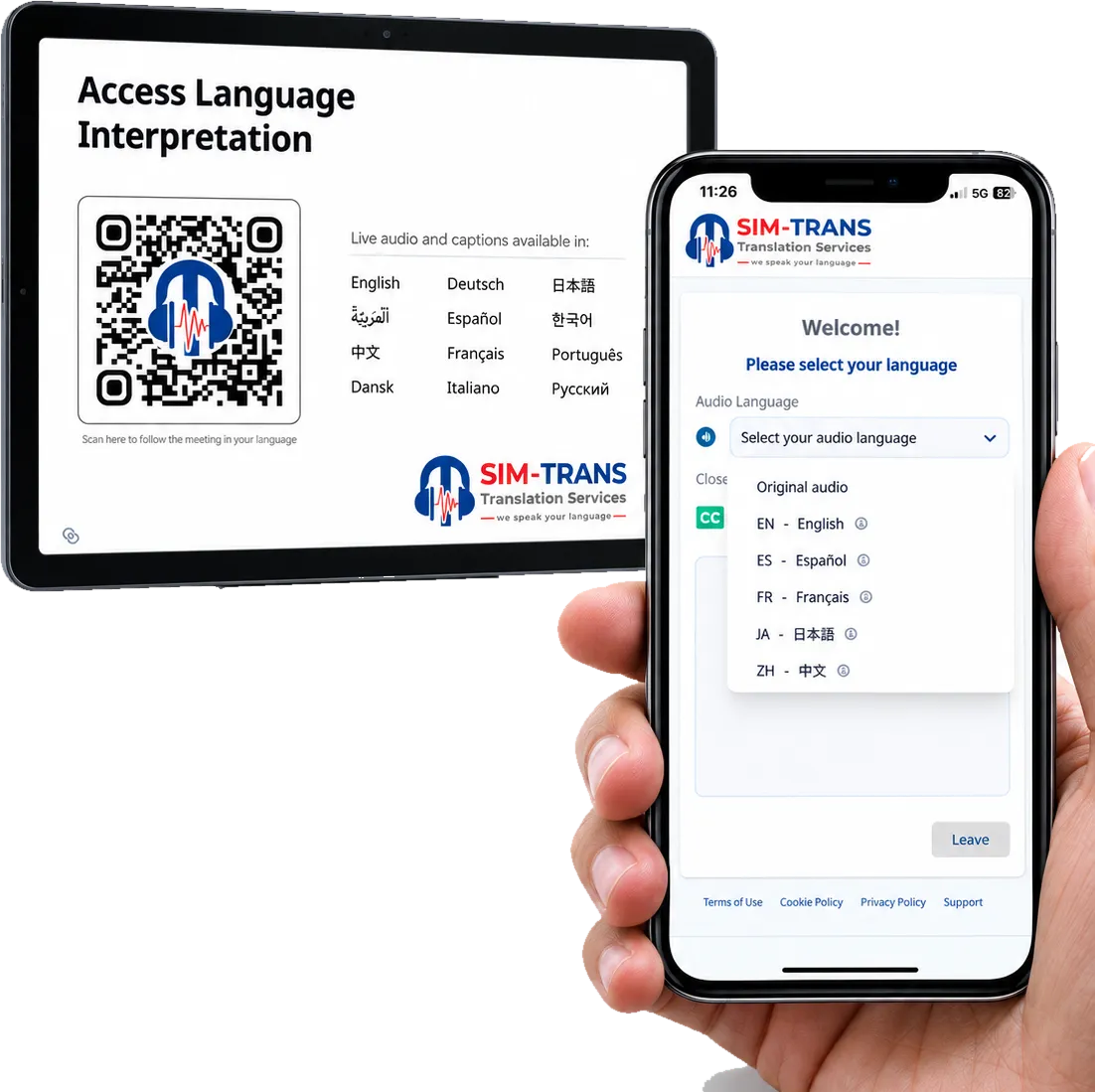
A tablet showing the event QR page and a phone showing the language selection.
A table card from the QR designer, and the guest page it opens.

The problem

“How will guests even find the interpretation, and who keeps an eye on it?”

Interpretation only helps if guests know it is there and can join in seconds. Organisers also need private sessions to stay private, late language requests handled without fuss, and someone watching every channel while they run the rest of the event.

What you get

Event toolkit, in detail.

  • Event card and QR designer

    Print-ready table cards, badges and screen slides carrying your session QR code.

  • Branded attendee page

    One scan opens your event page with your branding, in the phone’s browser. No app, no account, no sign-up.

  • Every language in its own script

    Guests see each language listed in its own script, so everyone can find theirs and choose it with one tap.

  • Private, PIN-protected sessions

    Only guests with the PIN can join, for board meetings, closed briefings and internal town halls.

  • Audio and captions, or captions only

    Guests choose to listen, read, or both. You can also run a session as captions only.

  • Add a language during the session

    A late request is a setting, not a new booth. We add the language while the session runs.

  • Live monitoring

    Our team watches every language channel throughout, so you can run your event.

How it runs

Step by step.

Every session is set up and monitored by a Sim Trans technician. You never touch the system.

  1. Brief us

    Share your programme, languages, branding and whether any session is private.

  2. Approve the materials

    We prepare the attendee page and print-ready cards, badges and slides for your approval.

  3. Guests join

    Scan, choose a language, listen or read. PIN entry for private sessions.

  4. We monitor

    Our team watches each channel live and handles changes, such as an added language, on the spot.

Specification

At a glance.

Print materials
Table cards, badges and screen slides with QR
Guest page
Branded, opens in the phone’s browser
Apps to install
0
Access
Open, or private with a PIN
Guest modes
Audio and captions, or captions only
Languages
81, up to 12 at once, added during the session if needed
Monitoring
Every channel, live, by our team

A good fit for

  • Conferences with several rooms and programmes
  • Exhibitions with stage programmes and walk-in audiences
  • Internal town halls and closed briefings
  • Events where the language list changes at the last minute
  • Organisers who want one team to handle the whole guest experience

Not the right tool for

  • Self-service use without our team: self-service subscription is coming soon
  • Guests without a phone, unless you plan an alternative for them
Where human interpreters fit

Features

Included in this solution.

  • Event card and QR designer

    Print-ready table cards, badges and screen slides with your session QR.

  • QR join and branded attendee page

    One scan opens your event page. No app, no account, no sign-up.

  • Private, PIN-protected sessions

    Only invited guests can join.

  • Audio and captions, or captions only

    Guests listen, read, or both. Organisers can run a captions-only session.

  • Add a language during a live session

    A late request is a setting, not a new booth.

  • Live monitoring

    Every language channel is watched in real time by our team throughout the session.

A multilingual event solution, from invitation to last session

Think of a three-day exhibition in Dubai with a conference stage, two workshop rooms and a closed investor briefing on the final afternoon. Visitors arrive from the GCC, India, Pakistan, the Philippines and Europe.

Before the show, we prepare the attendee page with the organiser’s branding and generate QR codes for each room. The print team receives table cards for the workshop rooms, a QR panel for the badge back, and a holding slide for the stage screens. The investor briefing is set as a private session, and its PIN goes out only with the invitations.

On day two, a delegation from Central Asia asks for Russian. We add it during the morning session and guests choose it from the list. Nothing is reprinted, because the QR code stays the same.

Throughout, our team watches every channel from one position at the side of each room and handles questions from the organiser’s staff.

What guests see

  1. Scan the QR code on a card, badge or screen.
  2. Choose a language, each listed in its own script, with one tap.
  3. Listen in their own earbuds, or read captions, or both.

A guest without earbuds can still follow by reading. A bilingual guest can read captions in their own language and tap “Show original” to see the speaker’s own words. The full guest journey is on how SIM.AI works.

What we look after

  • Print-ready files for cards, badges and slides
  • The branded attendee page and session settings
  • PINs for private sessions
  • Adding languages on request, during the session if needed
  • Live monitoring of every channel

The toolkit comes with every SIM.AI event, whether you run AI interpretation, live captions, or both. For planning the languages, read how many languages a Gulf audience needs. The toolkit is built for busy floors at exhibitions and trade shows.

Questions organisers ask

Do guests need an app or an account?

No. Guests scan the QR code and the event page opens in their phone’s browser. There is no app, no account and no sign-up.

Where should we put the QR code?

Wherever guests look before the session starts: table cards, badges, the holding slide on the screen, and the printed programme. We prepare print-ready files for each.

How do private sessions work?

A private session needs a PIN to join. You share the PIN only with invited guests, for example in the invitation or at the door.

Can we add a language after the session has started?

Yes. A language can be added during a live session. Guests who need it simply choose it from the list.

Who watches the channels during the event?

Our team. Every language channel is monitored live throughout the session, and you never need to touch the system.

Planning an event?

Let’s talk about your event.

Tell us the venue, the date and the languages. We reply within 24 hours with a plan and a quote.

Call
+971 56 685 4225
Email
ai@sim-trans.com
Based in
Dubai and Abu Dhabi, serving the UAE and GCC